

Library Seat Finder
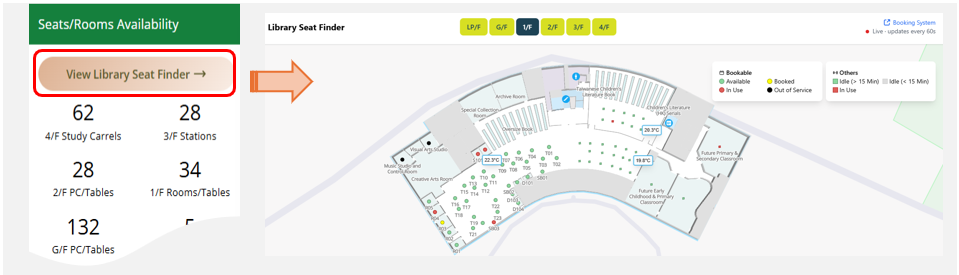
The Library is pleased to introduce the new “Library Seat Finder” powered by IoT (Internet of Things) technology. This new application will show real-time availability of seats as well as indoor temperature on all floors of MMW Library.
What can be seen on the floor maps of Library Seat Finder?
- Real-time Seat Status: Library users will see which seats are occupied, which seats are available for booking, and which seats may be unoccupied*
- Indoor Temperature : Provide current indoor temperature in different zones on each floor, helping you select an area with temperature more comfortable for you.
* Status of bookable seats is based on data from the booking system. Status of walk-in seats is based on activity levels of seats detected by IoT sensors. Actual conditions may vary.
How to access Library Seat Finder:
- Click “Library Seat Finder” on the homepage of Library Website.
- Select a floor. Map of that floor will be displayed.
- Real-time status of bookable seats will be displayed in circular icons. Green icons represent seats available for booking.
- Idleness and occupancy of walk-in seats will be displayed in square icons. Green icons represent seats with no activities detected by IoT sensors for more than 15 min and hence may be unoccupied.
The application is currently in its pilot phase, and will later be integrated into the Library’s mobile apps by phase. We encourage you to use it and welcome your valuable feedback for future enhancements.
For any enquiries, please contact Library Service Counter at 2948 6653.